
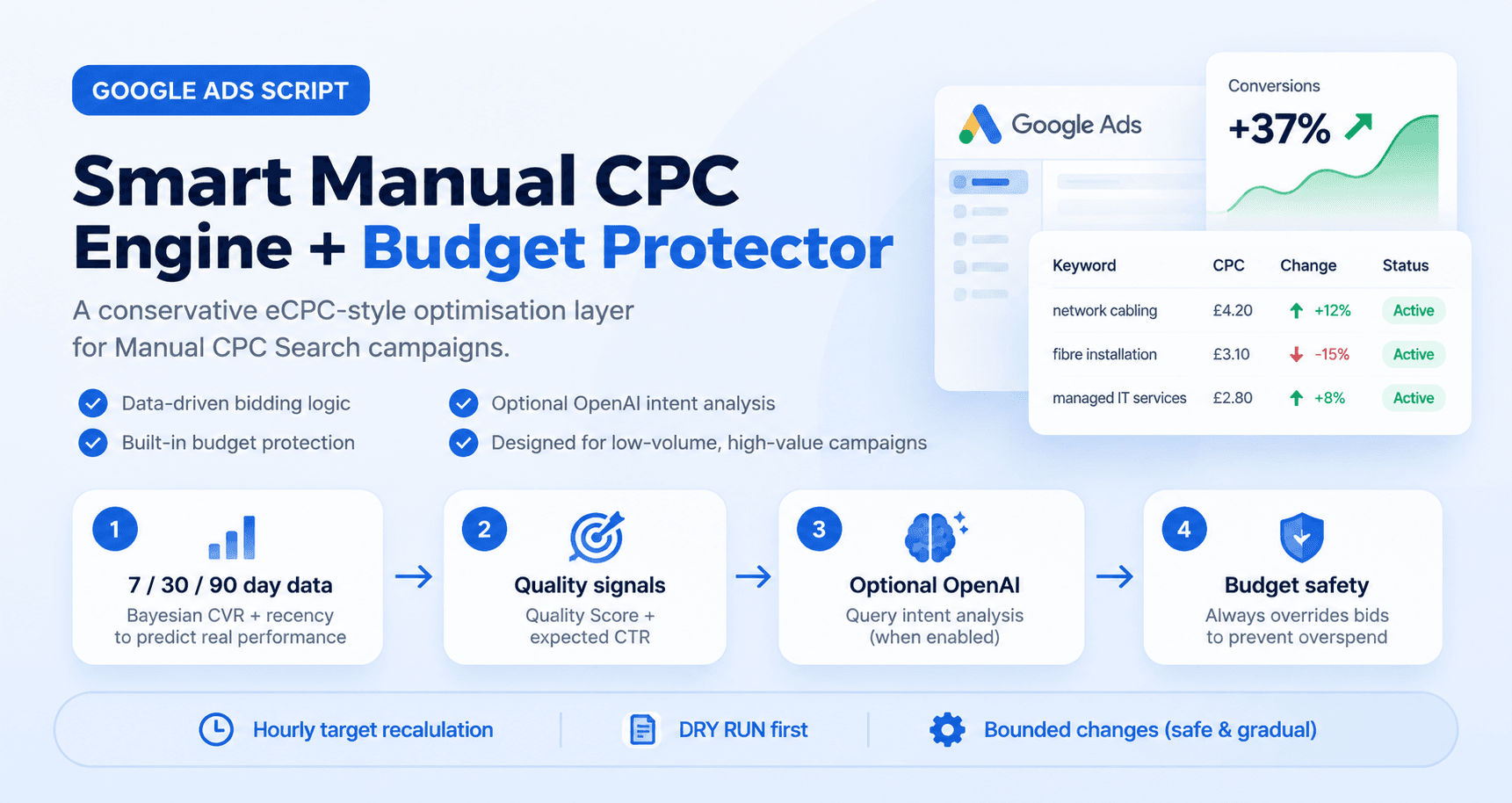
Figure 1. The Smart Manual CPC Engine v1.1 combines performance modelling with a separate budget-protection layer.
Important limitation |
Why build this at all?
Enhanced CPC used to sit in a useful middle ground: advertisers kept a Manual CPC structure, while Google could raise or lower bids when a click looked more or less likely to convert. Google has since retired ECPC for Search and Display; campaigns that were not migrated effectively fell back to Manual CPC. [1]
That creates a gap for advertisers who deliberately want Manual CPC — especially low-volume, high-value lead generation accounts where every conversion matters, but conversion volume may be too thin to blindly hand all control to an automated strategy.
The idea behind this script is simple: keep Manual CPC, but add a conservative decision layer that recalculates a target CPC every hour. It can increase, hold or decrease a keyword bid based on evidence, while a separate budget-protection system always has veto power.
The core design principle |
What the Smart Manual CPC Engine actually does
The script only operates on eligible Manual CPC Search campaigns. It analyses each keyword, builds a target CPC from recent and longer-term evidence, applies movement caps, then checks whether the campaign is pacing too quickly before any live change is permitted.
· Runs as an hourly optimiser: each run recalculates a target instead of blindly adding or subtracting a percentage from the previous hour.
· Uses 7-day, 30-day and 90-day performance windows with Bayesian smoothing to avoid overreacting to tiny samples.
· Requires minimum confidence and click evidence before normal increases or decreases are allowed.
· Can use Quality Score and related quality buckets as small, bounded signals rather than dominant decision makers.
· Can optionally classify search terms with OpenAI to estimate buyer intent, relevance and negative-keyword risk.
· Caps how far a bid may move in one run and across a day.
· Monitors campaign budget pacing, runaway keyword spend share and CPC anomalies.
· Lets budget protection override the smart target, including temporary emergency pauses under tightly constrained conditions.
· Runs in DRY RUN mode first so proposed changes can be audited before the script is allowed to edit bids.
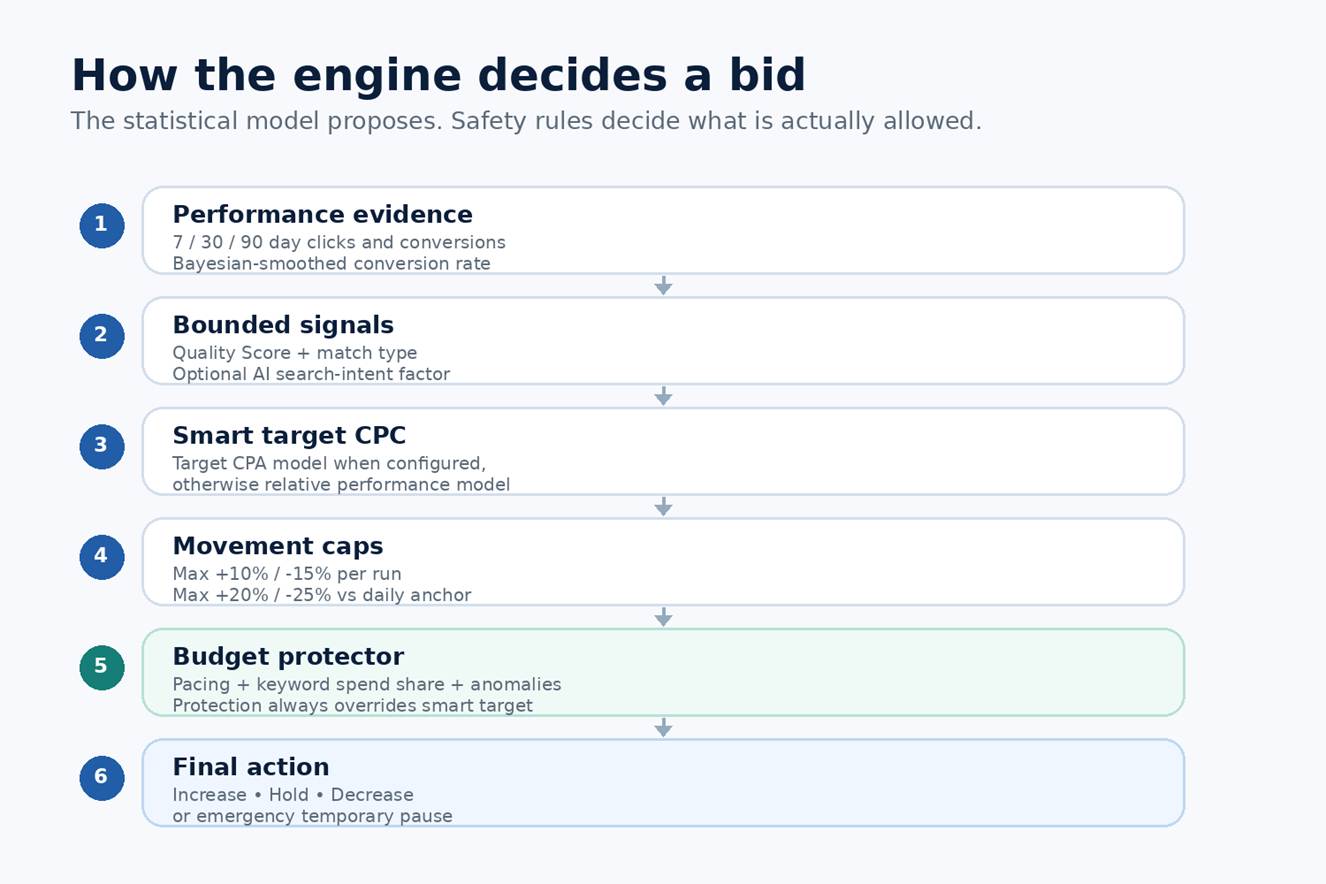
Figure 2. Decision hierarchy: statistical optimisation first, budget safety last.
The hourly decision cycle
1. Pull fresh keyword statistics and campaign-level conversion evidence.
2. Calculate smoothed conversion-rate estimates for 7, 30 and 90 days.
3. Blend those estimates with heavier weight on recent data.
4. Apply small quality, match-type and optional search-intent factors.
5. Calculate the smart target CPC.
6. Reject the change when confidence or evidence gates are not met.
7. Apply hourly and daily movement limits.
8. Evaluate budget pacing and runaway-spend protection.
9. Write the final action to the log; in LIVE mode, update CPC and labels.
It does not compound bids every hour
This matters. A naïve script might see a strong keyword and apply +10% every hour: £4.00 → £4.40 → £4.84 → £5.32 and so on. That is not what this engine does. It maintains a daily anchor and recalculates a target CPC. If the evidence still points to roughly £4.40 on the next run, the bid holds rather than receiving another automatic +10%.
Why Bayesian smoothing matters for low-volume PPC
The most dangerous rule in low-volume lead generation is “zero conversions equals bad keyword.” A keyword with eight clicks and no conversions has almost no statistical certainty. Treating it as proven waste can remove the very traffic that eventually produces a high-value enquiry.
v1.1 uses campaign conversion rate as a prior and blends it with keyword evidence. The prior is deliberately stronger when the observation window is larger: 12 prior clicks for 7-day data, 20 for 30-day data and 30 for 90-day data. The resulting smoothed rates are blended 50% / 30% / 20%, giving recent behaviour more influence while still stabilising noisy weeks.
Evidence gate in v1.1 |
The safety limits are explicit in code
The script is intentionally conservative. Its most important limits are visible in the configuration block, so an advertiser can review and change them rather than relying on hidden behaviour.

Figure 3. v1.1 safety gates: DRY RUN, evidence thresholds and bounded per-run/daily movement.
Control | v1.1 default | What it prevents |
Per-run increase | +10% max | One hourly run cannot sharply inflate a bid. |
Per-run decrease | -15% max | Normal optimisation cannot suddenly collapse a bid. |
Daily increase | +20% vs anchor | Repeated hourly runs cannot compound indefinitely. |
Daily decrease | -25% vs anchor | Normal optimisation remains gradual. |
Minimum confidence | 15% | Low-data keywords hold instead of moving on weak evidence. |
Zero-conversion down-bid | 15 clicks minimum | A handful of non-converting clicks is not treated as proof. |
OpenAI factor | 0.92× to 1.07× | Language classification cannot dominate the bid model. |
The budget protector is not another optimiser — it is the governor
Running a separate bid optimiser and a separate budget script is risky because both can edit the same CPC. One can raise a bid that the other has just reduced, or an old “restore original bid” routine can overwrite the smarter baseline the following morning.
v1.1 merges both jobs into one decision hierarchy. The smart model generates a target CPC first. The budget layer then checks campaign budget used, progress through the advertising day, keyword spend share, CPC anomalies and historical daily-spend anomalies. When protection triggers, it wins.
Protection stages |
The pacing windows in the current configuration assume an advertising day from 07:00 to 22:00. Protection starts only after at least 50% of the budget has been consumed, then becomes progressively stricter as spend approaches the daily limit.
Where OpenAI helps — and where it should not
Search terms are language. That is exactly where an LLM can add information that ordinary keyword statistics may not reveal quickly enough. The script can batch new search terms and classify them as buyer, commercial research, informational, DIY, job seeking, training, support, irrelevant or other.
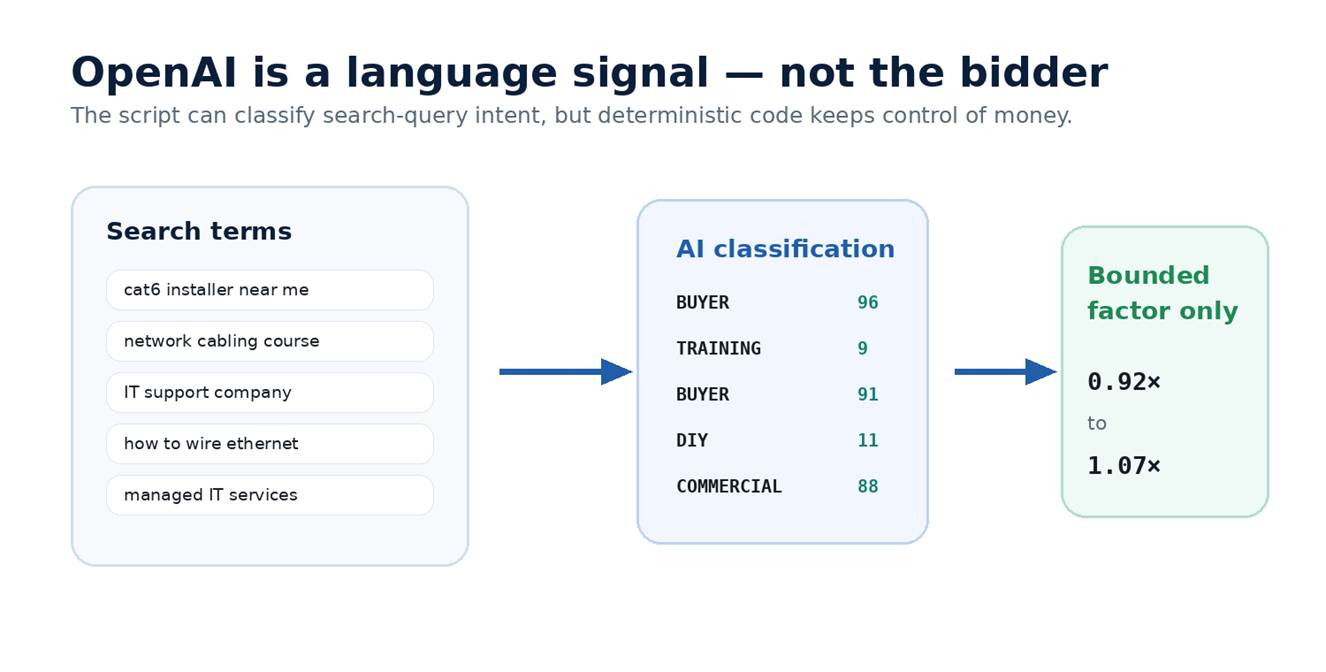
Figure 4. Optional OpenAI classification is converted into a small bounded factor; the model never sets the CPC.
For each term the structured output includes buyer score, relevance score, whether the term looks like a negative-keyword candidate and classification confidence. Those values are aggregated back to the parent keyword and turned into a factor constrained between 0.92× and 1.07×.
That architecture matters. An LLM should not receive a row of campaign metrics and be asked “what should I bid?” The language model is useful for semantic intent. Deterministic code is better for caps, thresholds, state management and financial control.
Cost control |
The first dry run proved why preview mode matters
Before allowing a bidding script to touch a live account, the safest approach is to make the log behave exactly as if it were live while suppressing all account writes. The first test of this project did exactly that — and immediately exposed a flaw worth fixing.
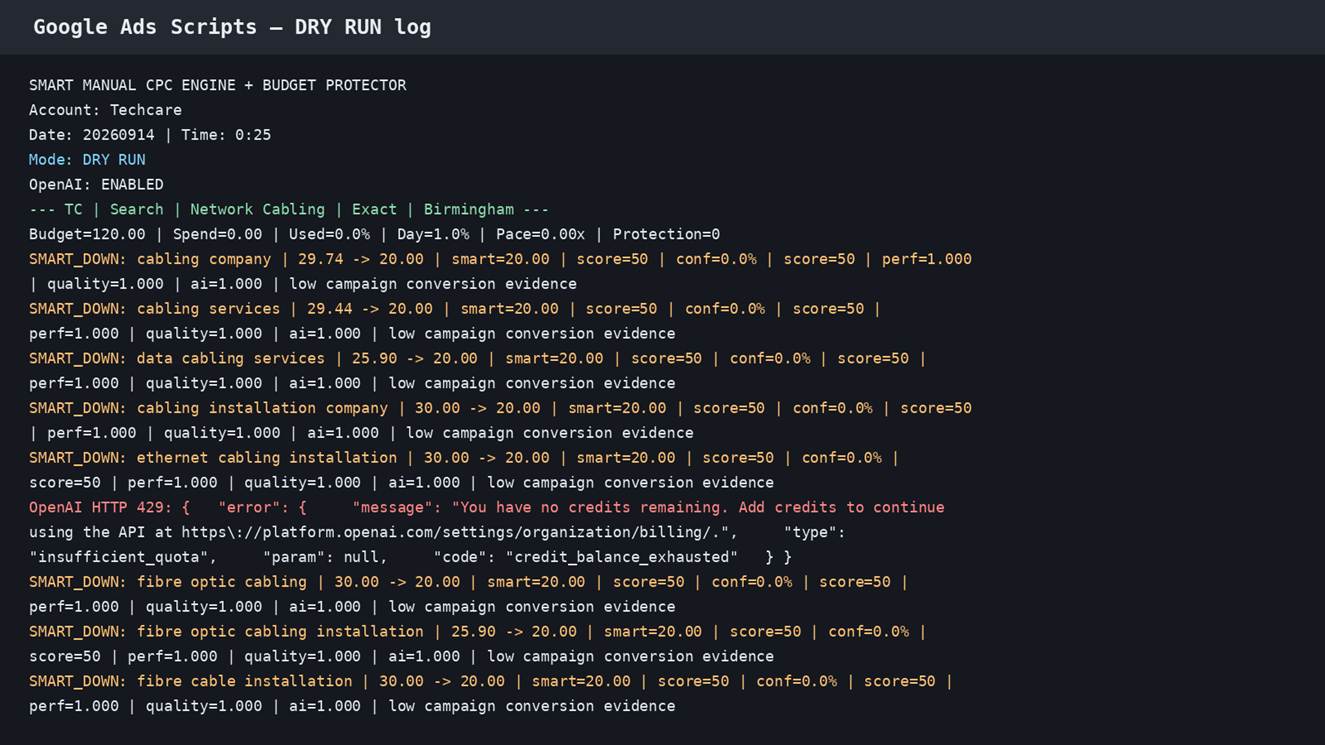
Figure 5. Real dry-run output. The account was analysed, but no live CPCs were changed.
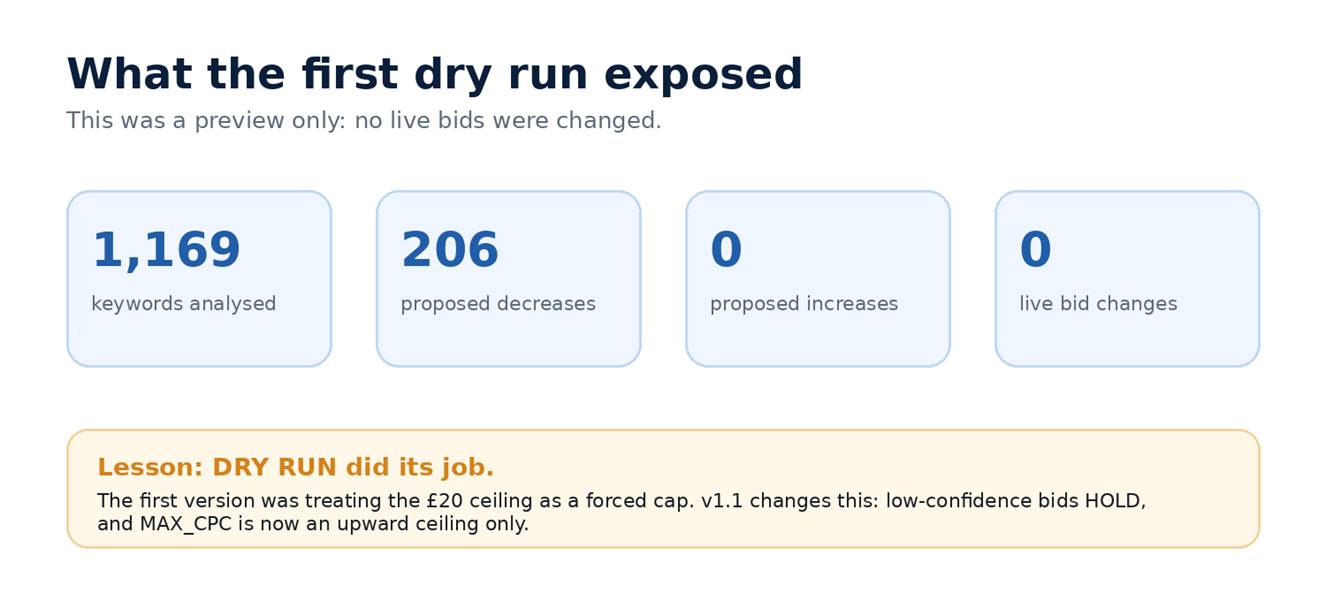
Figure 6. First-test summary: 1,169 keywords analysed and 206 proposed decreases — all preview-only.
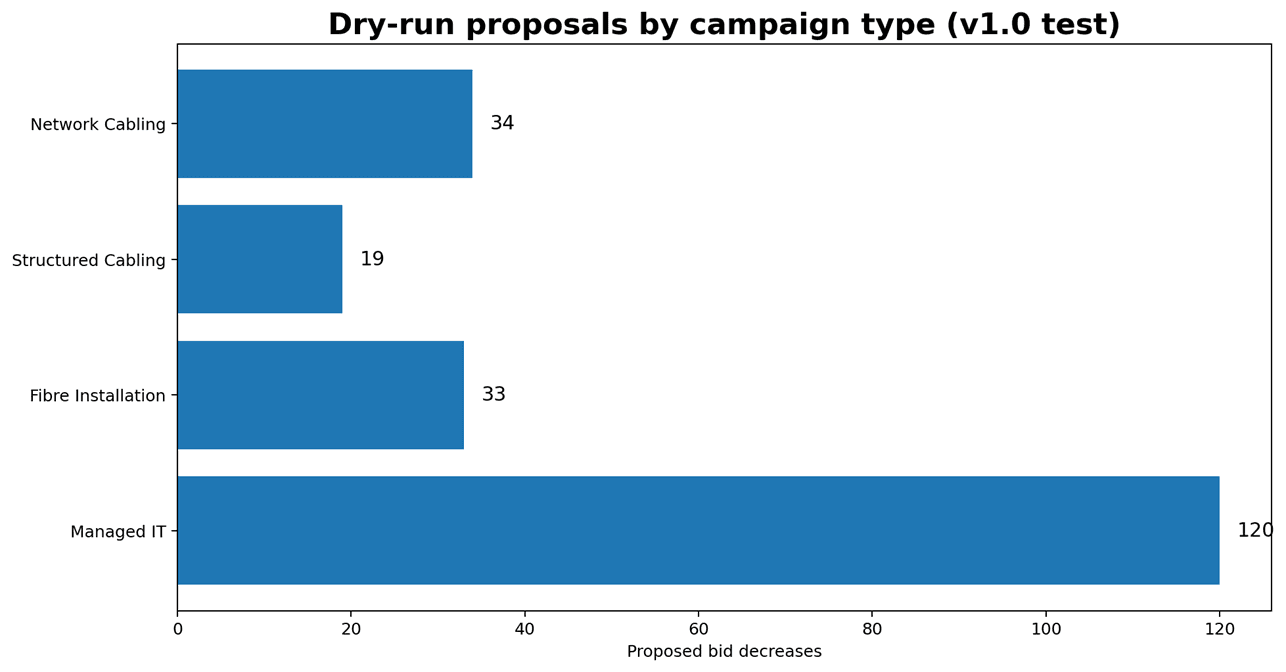
Figure 7. Distribution of the 206 proposed decreases in the first dry run.
The pattern was suspicious: many high bids were being pushed straight to £20 even when the log showed 0% confidence and “low campaign conversion evidence.” The reason was not poor performance. The original MAX_CPC value was being applied as a universal clamp, so a £30 bid could be forced down to £20 merely because £20 was the configured ceiling.
What changed in v1.1
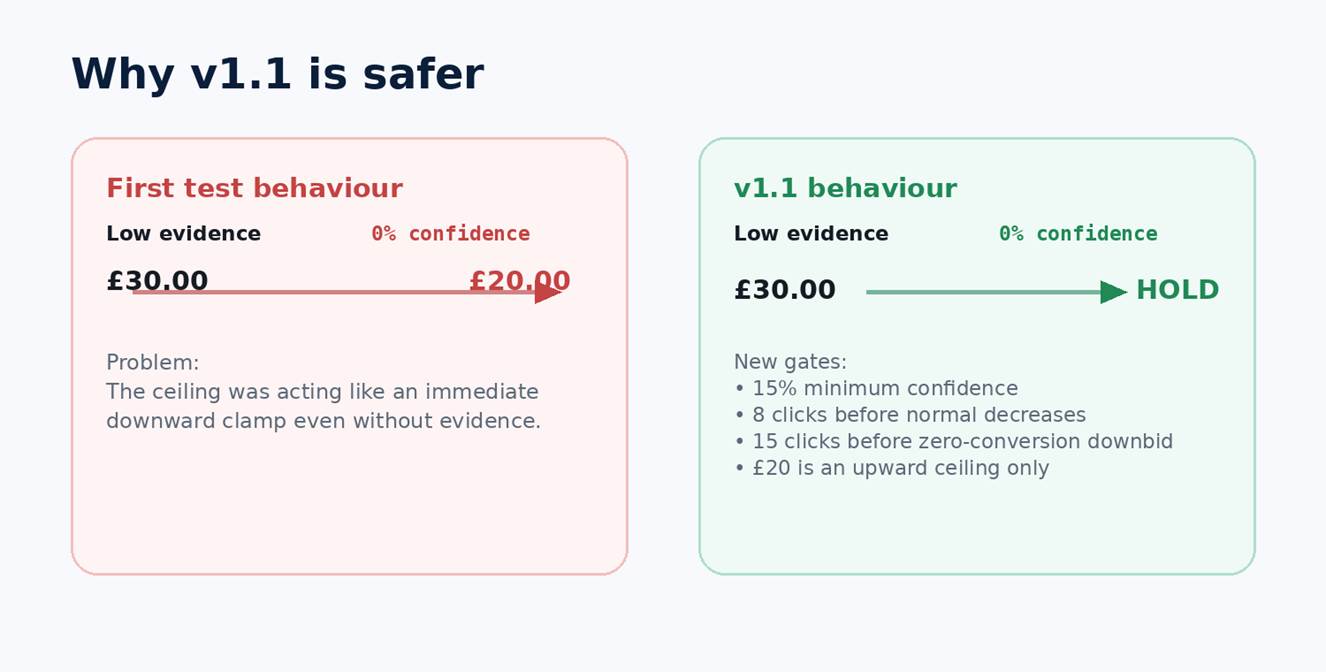
Figure 8. v1.1 turns the £20 setting into an upward ceiling only and adds stronger evidence gates.
The fix changes the philosophy from “every bid must fit under the configured ceiling” to “the script may not raise a bid above the ceiling.” Existing bids above £20 can remain there. They only move down when performance evidence supports a reduction, and the reduction is still constrained by the per-run and daily movement limits.
Why this is a feature, not an embarrassment |
Three example bid decisions
1. Strong keyword with enough evidence
Suppose a keyword sits at £4.00, has enough click and conversion history, and the model calculates a £4.80 target. The per-run increase limit is +10%, so the first live change can be no higher than £4.40. On the next hour the model recalculates; it does not automatically add another 10%.
2. Low-volume keyword with zero conversions
A keyword with six clicks and zero conversions does not meet the normal decrease gate. Even if Quality Score is weak, v1.1 holds because the statistical evidence is too thin. Once the sample becomes meaningful, the model can respond gradually.
3. Good keyword during a budget emergency
A keyword may deserve a higher smart target while the campaign as a whole is running too fast. The budget protector still wins. If Stage 2 is active, the safety layer can reduce the permitted CPC even though the statistical model wants to increase it. Performance optimisation never outranks budget survival.
What this can — and cannot — replace from old eCPC
Google’s old ECPC adjusted bids at auction time and could use a broad set of auction-time signals. Google specifically described signals including browser, location and time of day. [1] An hourly script cannot observe every auction or reproduce Google’s proprietary prediction stack.
What this approach can reproduce is the operating idea: bid more aggressively when evidence improves and reduce exposure when evidence deteriorates, while still keeping a Manual CPC account structure. Google Ads Scripts currently exposes keyword CPC methods such as getCpc(), setCpc() and clearCpc(), and Google’s own examples show setting a keyword CPC under a compatible CPC strategy. [2][3]
Capability | Old Google ECPC | This script |
Auction-time changes | Yes | No — hourly script runs |
Proprietary Google signals | Yes | No |
Raise and lower Manual CPC | Yes | Yes, within script caps |
Transparent rules | Limited | Yes — thresholds are visible in code |
Budget pacing governor | Not the same design | Yes |
Bayesian low-volume smoothing | Not user-configurable | Yes |
LLM query classification | No | Optional, bounded signal |
DRY RUN preview | N/A | Yes |
How I would deploy it safely
1. Disable any other script that edits the same keyword bids. Two bid controllers can fight each other.
2. Paste v1.1 into Google Ads Scripts and leave DRY_RUN: true.
3. Run it manually and inspect the complete log. Look for unexplained SMART_UP or SMART_DOWN actions.
4. Run at least one full business day in DRY RUN so the budget pacing logic is observed at different spend levels.
5. Set realistic target CPA overrides only where the economics are genuinely known; leaving target CPA at 0 uses the relative-performance model.
6. If using OpenAI, define BUSINESS_CONTEXT carefully, fund the API account, set the key once in Script Properties and keep the AI factor bounded.
7. Only after the preview is sensible should DRY_RUN be changed to false and the script scheduled hourly.
8. Continue reviewing labels and logs. Automation should make bid management auditable, not invisible.
The bigger idea: automation without surrendering control
The interesting part of this project is not simply that a Google Ads Script can edit a CPC. Google has supported programmatic keyword bids for years. The more useful idea is how the pieces are separated: statistics estimate value, language models interpret language, hard-coded rules constrain risk and a budget governor has the final say.
For accounts with abundant conversion data, Google’s native Smart Bidding strategies may still be the obvious choice. But for advertisers who intentionally stay on Manual CPC — particularly low-volume, high-value B2B campaigns — this architecture offers a way to automate some of the judgement without letting a single noisy hour, a single expensive click or an LLM response take control of the account.
Bottom line |
Sources and technical references
[1] Google Ads Help — About Enhanced CPC (ECPC): support.google.com/google-ads/answer/2464964
[2] Google for Developers — Google Ads Scripts: Bidding: developers.google.com/google-ads/scripts/docs/campaigns/bidding
[3] Google for Developers — AdsApp.KeywordBidding reference: developers.google.com/google-ads/scripts/docs/reference/adsapp/adsapp_keywordbidding
[4] Project source material: Smart Manual CPC Engine v1.1 and its DRY RUN log. Figures 5–8 are based on the actual test output supplied with the script.
Practical disclaimer
This script changes advertising bids and can materially affect spend, traffic and lead volume when run live. Review the code for your account structure, conversion setup, currency, budgets, schedules and commercial targets. Test in DRY RUN first and monitor closely after enabling live changes.